Sleep Sounds With a Timer: Fade Out Instead of Stopping
The timer is the most underrated setting in any sleep sound app. Get it wrong and the app that put you to sleep wakes you back up.
Last updated: July 11, 2026
Short answer: match the timer to your problem. Trouble falling asleep: 45–60 minutes with fade-out. Waking up from noise at night: all night, up to 10 hours in DRMN. Either way the audio must end with a gradual fade, because a hard stop registers in your sleeping brain like any other sudden change.
Why the ending matters as much as the sound
Asleep, your auditory system keeps monitoring the room. It ignores whatever stays constant and flags whatever changes. A steady sound that vanishes in an instant is a change — the acoustic equivalent of a light snapping off in a lit room. Light sleepers surface, check the silence, and now it's 2 a.m. and they're awake.
A gradual fade solves this by making the ending too slow to notice. DRMN lowers volume over an extended window, so by the time playback stops, the difference between "very quiet" and "silent" is beneath your waking threshold.
All night vs timed: which do you need?
| Your situation | Timer setting | Why |
|---|---|---|
| Slow to fall asleep, sleep through fine | 45–60 min, fade-out | Sound does its job at onset; no need to run the speaker for 8 hours |
| Wake from noise mid-night | 8–10 hours | Masking has to be there when the garbage truck is |
| Wake at the same early hour | All night | Early morning is when outside noise ramps up and sleep is lightest |
| Naps | 20–30 min, fade-out | The fade doubles as a gentle end-of-nap signal |
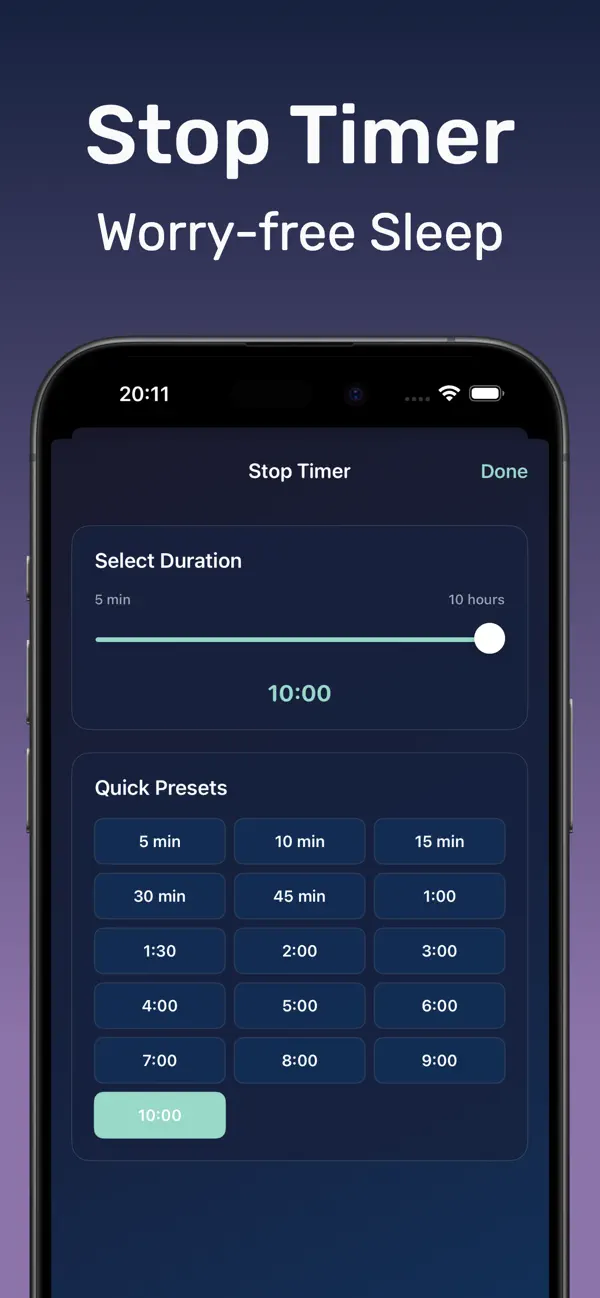
How to set the fade timer in DRMN
- Download Sound Machine Deep Sleep DRMN free from the App Store.
- Start your sound or mix — rain, brown noise, fan, or a layered combination.
- Open the timer and pick your duration: 45–60 minutes for sleep onset, 8–10 hours for all-night masking.
- Playback fades gradually as the timer ends. No action needed, no hard stop, no 3 a.m. silence shock.
- Lock the screen. The timer runs in the background and stops playback on its own.


Frequently asked questions
Should sleep sounds play all night or on a timer?
Timer for trouble falling asleep, all night for noise that wakes you later. DRMN handles both, up to 10 hours.
Why does the fade-out matter?
An abrupt stop is a change your sleeping brain notices, like a light snapping off. A slow fade stays below the waking threshold.
Can the iPhone Clock timer do this?
The Clock app's "Stop Playing" timer halts audio instantly with no fade. Use the in-app timer instead so the ending stays gentle.